Local AI agents are no longer just a toy demo you run once and forget. With Ollama handling local models and LangGraph handling stateful orchestration, you can build a private agent system that plans, delegates, checks its own work, and resumes from checkpoints without sending your task history to a hosted LLM API.
This guide builds a compact but real agent swarm: a supervisor, a researcher, an architect, a coder, a reviewer, and a finalizer. It runs on your own machine, uses a local Ollama model, and keeps the control flow explicit enough that you can debug it when the model takes a strange turn.
What we are building
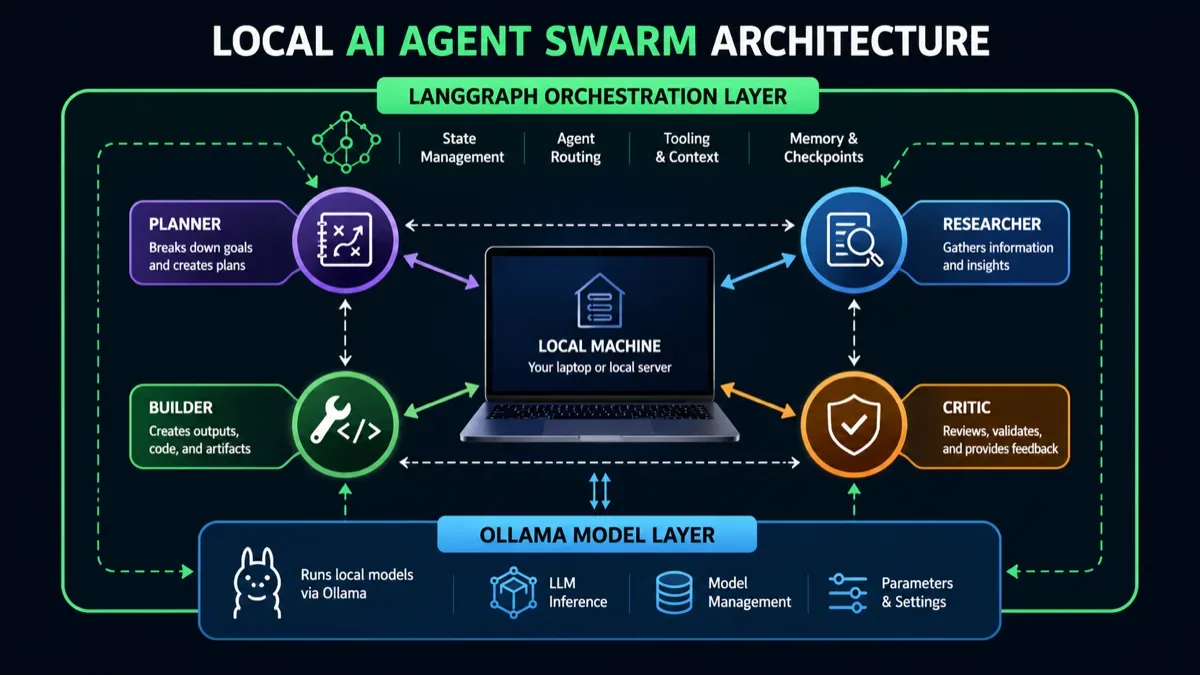
The word swarm is often abused. Here it means a group of specialized agents coordinated through shared state, not a magic pile of prompts talking over each other.
The architecture has four layers:
- Ollama runs the local LLM and exposes it through a local API.
- LangChain’s ChatOllama integration gives Python code a clean chat-model interface.
- LangGraph turns the workflow into a state machine with nodes, edges, routing, and checkpointing.
- Your agents are just functions with narrow responsibilities and explicit state updates.
The important design choice: the supervisor does not let every agent speak at once. It routes work step by step. That is slower than naive parallelism, but easier to control, inspect, and recover.
Why run agents locally
Local agents make sense when the task contains private context, internal documents, code, customer data, personal notes, or anything you do not want copied into a third-party inference service.
They are also attractive when you want predictable cost. The software stack in this guide can run without a monthly LLM subscription if your machine is strong enough for the model you choose. That does not make local inference free: you still pay in hardware, electricity, setup time, and slower iteration. But the cost curve is different. You trade API bills for ownership and operational responsibility.
Use this setup for:
- private code review and refactoring plans;
- document triage over local files;
- repeatable research workflows over an internal knowledge base;
- offline drafting and summarization;
- experimentation with agent architectures before moving to managed infrastructure.
Do not use it as-is for:
- high-risk actions such as payments, account deletion, or production database writes;
- workloads that need the best frontier-model reasoning;
- large-scale concurrent serving;
- tasks where latency matters more than privacy or cost control.
Prerequisites
You need Python 3.11 or newer, Ollama installed, and at least one local model pulled. Start with a smaller general model while debugging the graph. Bigger models may reason better, but they also make every broken loop more expensive.
Install Ollama from Ollama, then pull a model from the Ollama model library. The exact best model changes quickly, so check the model tags before you build around one name. The examples below use qwen3 because Ollama’s current docs use it in tool-calling examples.
ollama pull qwen3
ollama run qwen3
In another terminal, check that the local API responds. Ollama’s default local API base URL is http://localhost:11434/api.
curl http://localhost:11434/api/generate -d '{
  "model": "qwen3",
  "prompt": "Say hello in one sentence.",
  "stream": false
}'
Now create a Python environment and install the orchestration packages.
mkdir local-agent-swarm
cd local-agent-swarm
python -m venv .venv
source .venv/bin/activate
pip install -U langgraph langchain-ollama langchain-core pydantic typing-extensions
The complete local swarm
Create local_swarm.py and paste this code.
from __future__ import annotations

import operator
import os
from typing import Annotated, Literal

from langchain_ollama import ChatOllama
from langgraph.checkpoint.memory import InMemorySaver
from langgraph.graph import END, START, StateGraph
from pydantic import BaseModel, Field
from typing_extensions import TypedDict

MODEL = os.getenv('OLLAMA_MODEL', 'qwen3')

llm = ChatOllama(
    model=MODEL,
    temperature=0,
)

class Route(BaseModel):
    next_agent: Literal['researcher', 'architect', 'coder', 'reviewer', 'finalizer'] = Field(
        description='The specialist that should run next.'
    )
    task: str = Field(description='A short task for that specialist.')
    reason: str = Field(description='Why this specialist is the next best step.')

class SwarmState(TypedDict):
    goal: str
    current_task: str
    active_task: str
    iteration: int
    max_iterations: int
    supervisor_notes: Annotated[list[str], operator.add]
    research: Annotated[list[str], operator.add]
    architecture: Annotated[list[str], operator.add]
    code: Annotated[list[str], operator.add]
    review: Annotated[list[str], operator.add]
    final: str

router = llm.with_structured_output(Route)

def make_brief(state: SwarmState) -> str:
    nl = chr(10)
    parts = []
    for key in ['supervisor_notes', 'research', 'architecture', 'code', 'review']:
        values = state.get(key, [])
        if values:
            parts.append(key.upper() + ':' + nl + nl.join(values[-2:]))
    return nl + nl.join(parts) if parts else 'No shared notes yet.'

def supervisor(state: SwarmState) -> dict:
    if state['iteration'] >= state['max_iterations']:
        return {
            'active_task': 'finalizer',
            'current_task': 'Prepare the best possible final answer from the work completed so far.',
            'supervisor_notes': ['Stopped by max_iterations to prevent an infinite loop.'],
        }

    decision = router.invoke([
        ('system', 'You are the supervisor of a local multi-agent workflow. Route one next step only. Prefer finalizer when the answer is ready. Do not loop unless a concrete gap remains.'),
        ('human', 'Goal:' + chr(10) + state['goal'] + chr(10) + chr(10) + 'Current shared state:' + chr(10) + make_brief(state)),
    ])

    return {
        'active_task': decision.next_agent,
        'current_task': decision.task,
        'iteration': state['iteration'] + 1,
        'supervisor_notes': ['Route to ' + decision.next_agent + ': ' + decision.reason],
    }

def call_agent(name: str, system_prompt: str, state: SwarmState) -> str:
    response = llm.invoke([
        ('system', system_prompt),
        ('human', 'Goal:' + chr(10) + state['goal'] + chr(10) + chr(10) + 'Assigned task:' + chr(10) + state['current_task'] + chr(10) + chr(10) + 'Shared state:' + chr(10) + make_brief(state)),
    ])
    return name + ':' + chr(10) + response.content.strip()

def researcher(state: SwarmState) -> dict:
    content = call_agent(
        'Researcher',
        'Find assumptions, missing facts, constraints, and useful context. Do not invent external facts. If evidence is missing, say so clearly.',
        state,
    )
    return {'research': [content]}

def architect(state: SwarmState) -> dict:
    content = call_agent(
        'Architect',
        'Design the workflow, data structures, failure boundaries, and tradeoffs. Be specific and implementation-oriented.',
        state,
    )
    return {'architecture': [content]}

def coder(state: SwarmState) -> dict:
    content = call_agent(
        'Coder',
        'Produce concise implementation steps or code. Prefer simple, testable Python. Mention assumptions that affect correctness.',
        state,
    )
    return {'code': [content]}

def reviewer(state: SwarmState) -> dict:
    content = call_agent(
        'Reviewer',
        'Review the proposed work for bugs, missing checks, unsafe actions, and vague claims. Return concrete fixes.',
        state,
    )
    return {'review': [content]}

def finalizer(state: SwarmState) -> dict:
    response = llm.invoke([
        ('system', 'Write the final answer. Use the shared state, resolve contradictions, and be direct. Do not mention internal agent names unless useful.'),
        ('human', 'Goal:' + chr(10) + state['goal'] + chr(10) + chr(10) + 'Shared state:' + chr(10) + make_brief(state)),
    ])
    return {'final': response.content.strip()}

def route_from_supervisor(state: SwarmState) -> str:
    return state['active_task']

builder = StateGraph(SwarmState)

builder.add_node('supervisor', supervisor)
builder.add_node('researcher', researcher)
builder.add_node('architect', architect)
builder.add_node('coder', coder)
builder.add_node('reviewer', reviewer)
builder.add_node('finalizer', finalizer)

builder.add_edge(START, 'supervisor')
builder.add_conditional_edges(
    'supervisor',
    route_from_supervisor,
    {
        'researcher': 'researcher',
        'architect': 'architect',
        'coder': 'coder',
        'reviewer': 'reviewer',
        'finalizer': 'finalizer',
    },
)

for node in ['researcher', 'architect', 'coder', 'reviewer']:
    builder.add_edge(node, 'supervisor')

builder.add_edge('finalizer', END)

graph = builder.compile(checkpointer=InMemorySaver())

if __name__ == '__main__':
    initial_state: SwarmState = {
        'goal': 'Design a local document summarizer for private meeting notes. Include architecture, risks, and a minimal implementation plan.',
        'current_task': '',
        'active_task': '',
        'iteration': 0,
        'max_iterations': 8,
        'supervisor_notes': [],
        'research': [],
        'architecture': [],
        'code': [],
        'review': [],
        'final': '',
    }

    config = {'configurable': {'thread_id': 'local-swarm-demo-001'}}
    result = graph.invoke(initial_state, config=config)
    print(result['final'])
Run it:
python local_swarm.pyTo try a different model without editing code:
OLLAMA_MODEL=gemma3 python local_swarm.pyHow the graph works
LangGraph models work as graphs: nodes do work, edges decide where execution goes next, and state carries the memory of the run. START and END are special graph markers. Conditional edges let the supervisor choose which node runs next.
In this example, the supervisor is the only router. That keeps the graph legible:
START -> supervisor -> specialist -> supervisor -> specialist -> supervisor -> finalizer -> ENDThe state has append-only lists for research, architecture, code, review, and supervisor notes. Those list fields use reducers, so each specialist can add information without overwriting previous work. The scalar fields, such as current_task and active_task, are overwritten on each supervisor step.
That distinction matters. Most broken agent systems fail because memory is a pile of unstructured chat logs. A graph state gives every part of the workflow a known place to write.
Why checkpointing matters
The example uses InMemorySaver because it is simple and works for a local demo. It lets LangGraph associate a run with a thread_id, which is also the mechanism used for pause and resume patterns.
For production, in-memory checkpoints are not enough. If the Python process dies, the checkpoint goes with it. LangGraph’s own reference recommends durable checkpoint stores, such as Postgres-based checkpointing, for production use. Treat InMemorySaver as a debugger and teaching tool, not as your reliability layer.
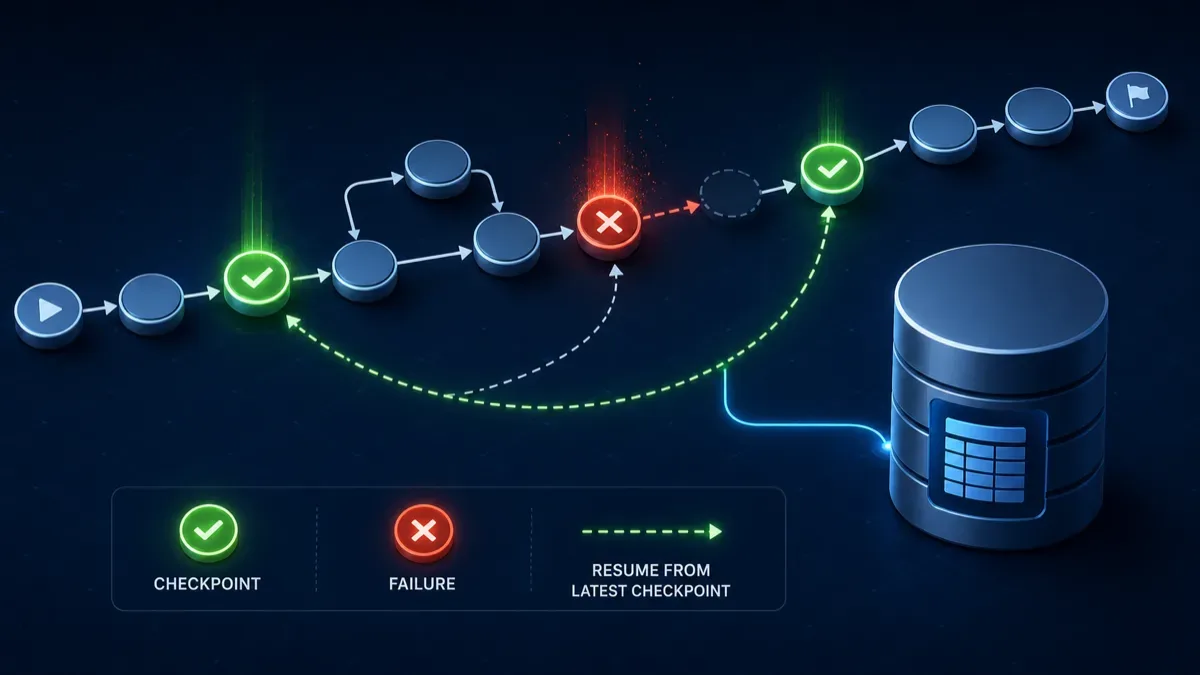
A practical production version should add:
- a durable checkpointer;
- stable thread IDs per user, task, or document;
- model and prompt version metadata in state;
- trace logs for every route decision;
- a maximum iteration limit;
- explicit human approval before irreversible tools run.
Adding tools without losing control
Ollama supports tool calling for models that can use tools, and LangChain’s ChatOllama integration exposes tool binding. That is useful, but do not start by giving a local agent shell access, filesystem writes, browser automation, and database credentials.
Start with narrow, boring tools:
- read a specific approved directory;
- search a local vector index;
- summarize a single file;
- create a draft patch but not apply it;
- validate JSON against a schema.
Then put human approval in front of dangerous actions. LangGraph’s interrupt pattern is designed for this: a node can pause execution, surface the proposed action, and resume only after a human decision. That is the difference between a useful autonomous workflow and a local model with too much authority.
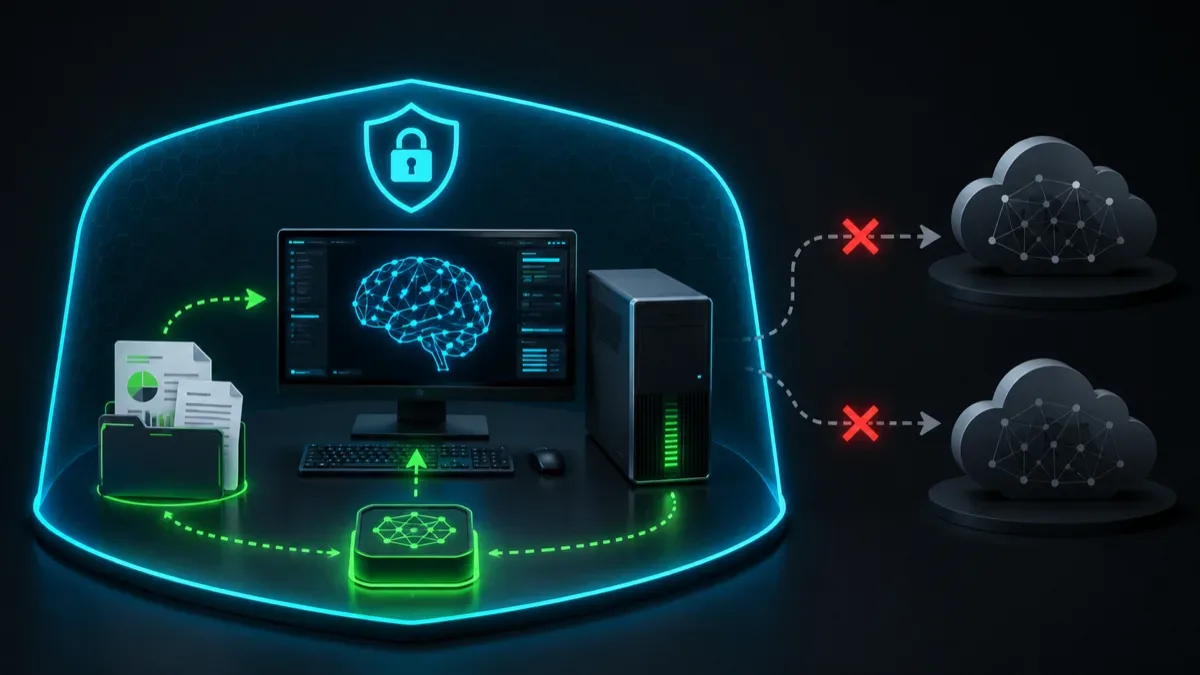
Privacy model: what stays local and what does not
If you run Ollama locally and use only local models, prompts and outputs are processed on your machine. That is the main privacy benefit of this stack.
But privacy can disappear through the tools you attach. If an agent calls a web search API, sends telemetry, uploads logs, or writes to a cloud vector database, the workflow is no longer fully local. The model runtime is only one part of the data path.
Before using this on sensitive material, check:
- whether Ollama is using a local model or a cloud model;
- whether any tool sends text outside the machine;
- where checkpoints are stored;
- whether logs contain raw prompts or documents;
- whether your model license allows your intended use.
Performance expectations
A local swarm is slower than a single prompt because it makes multiple model calls. It can still be worth it when each step improves quality: one agent scopes the problem, another designs the approach, another writes code, and another reviews the result.
If runs feel too slow, reduce max_iterations before changing models. Then shorten prompts, shrink shared state, or route fewer specialist steps. Bigger models are not a substitute for a clean graph.
Good defaults for early experiments:
- temperature 0 for routing and review;
- small max_iterations, usually 5 to 10;
- one supervisor, not peer-to-peer chaos;
- structured output for routing;
- final answer generated only after review has had a chance to run.
Common failure modes
The supervisor loops forever. Add max_iterations, stronger finalization criteria, and route logs.
The model ignores the requested JSON or structured output. Use a model with stronger structured-output behavior, reduce the schema, or add a fallback parser.
Specialists repeat each other. Give each node a narrower system prompt and show only the latest relevant state, not the entire transcript forever.
The final answer includes false certainty. Make the researcher and reviewer explicitly mark missing evidence. Do not ask a local model to invent facts it cannot verify.
The system is private but not safe. Privacy and safety are separate. A local agent can still delete files, leak secrets to a tool, or generate bad instructions. Gate tools by default.
When to move beyond this demo
This implementation is enough for a serious local prototype. Move to a stronger setup when you need multiple users, long-running jobs, audit trails, or real tool execution.
The next step is not adding more agents. It is making the existing graph observable and durable:
- swap InMemorySaver for a persistent checkpointer;
- stream intermediate state to a small local UI;
- add human approval for tool calls;
- store documents in a local vector database;
- evaluate outputs against a fixed test set;
- use a GPU cloud provider such as RunPod only when local hardware is the bottleneck and the data can safely leave the machine.
Bottom line
LangGraph and Ollama are a strong pair because they solve different problems. Ollama makes local model execution approachable. LangGraph makes agent control flow explicit, inspectable, and recoverable.
The result is not a magical autonomous employee. It is a private workflow engine powered by local LLM calls. That is more useful: you can see what it is doing, limit what it can touch, and improve the graph one node at a time.